Automating Accuracy: Why EVOLVE’s Hanger Placement Tool Changes Everything for MEP Contractors
Malik Abdulgader
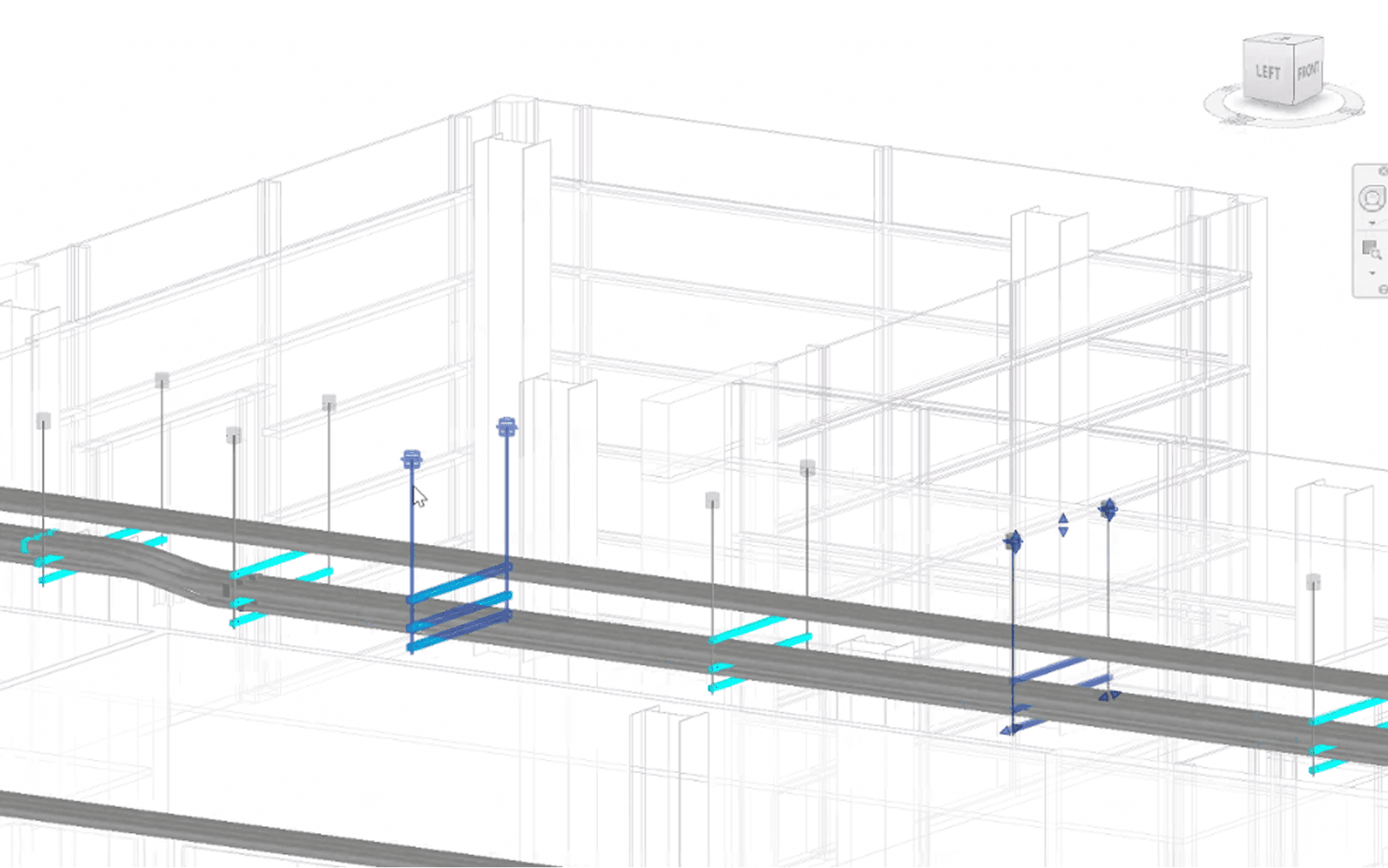
Placing hangers in Revit has traditionally been a slow, manual, and error-prone process. Designers spend countless hours inserting families, adjusting dimensions, rebuilding hangers, and trying to keep up with coordination changes (especially on large, fast-moving projects). EVOLVE’s Hanger Placement tool solves those headaches with one of the most powerful, fully rule-based hanger systems available today.
Rule-Based Hanger Automation That Builds Itself
The Hanger Placement tool lives inside EVOLVE’s Supports panel and allows teams to pre-define rules that match their exact standards and project requirements. Whether the system is electrical conduit or mechanical piping, users can set:
What hanger type to use for each material
Rod spacing, tier configuration, clearances, and dimensions
Placement frequency (e.g., every 8–10 feet)
Upper attachment types (Beam clamp, Rod clamp, Blue Banger, etc.)
Profiles for different project types or company standards
Once configured, users simply select a run of conduit or pipe, choose a profile, and EVOLVE automatically builds and places every hanger along the entire path (no repetitive modeling and no guesswork). If the system requires multi-tier support, EVOLVE builds that hanger dynamically in seconds. This removes hours of manual family adjustment that Revit users typically face.
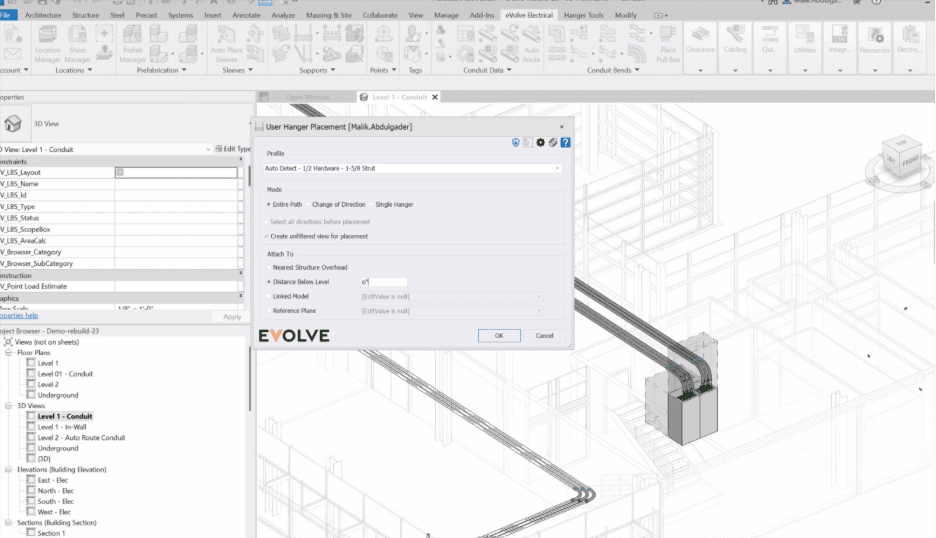
Autodetection: The Brain Behind the Automation
One of the most powerful aspects of EVOLVE’s hanger workflow is its autodetection engine, which reads the model and adapts in real time, which is something native Revit cannot do.
Automatic Tier Detection
If the selected conduits or pipes sit at different elevations, EVOLVE instantly detects the need for a multi-tier hanger. It then:
Builds the correct number of tiers
Spaces them accurately
Assigns proper rod lengths
Supports each elevation independently
Whether the model needs a three-tier trapeze or a simple single-tier hanger, EVOLVE figures it out for you.
Smart Switching Along the Run
As the system layout changes, EVOLVE adjusts automatically:
Multi-tier sections downgrade to two-tier
Two-tier sections downgrade to single-tier
Single-tier sections rebuild into multi-tier if needed
Users never have to delete, rebuild, or manually reconfigure hangers, EVOLVE adapts to the geometry as it changes.
Clash Autodetection + Auto-Correction
EVOLVE hangers detect clashes with:
Structure
Other systems
Steel
Equipment
Nearby rods and supports
And instead of simply alerting the user, EVOLVE automatically resolves them by shifting hangers back in increments you define (e.g., 6" or 12"). For many contractors, this eliminates hundreds of hours of coordination rework.
Built-In Point Layout Awareness
Because EVOLVE hangers come with embedded XYZ coordinates, autodetection also prepares them for point layout export, saving the field layout team hours of manual point marking.
EVOLVE doesn’t just automate hanger placement, but it intelligently interprets the model and reacts to it, giving teams an unprecedented level of precision with very little manual adjustment.
Smarter Content, Not Heavier Models
Many companies struggle because their hanger families aren’t parametric, forcing them to maintain dozens or hundreds of families just to accommodate simple dimensional changes. EVOLVE eliminates that bloat.
EVOLVE hangers are fully parametric, meaning a user can change rod lengths, tier spacing, or width with a simple checkbox or dimension input. No swapping families, no model slowdown, and no need for massive library maintenance. On the mechanical side, EVOLVE ships with extremely robust ITM content; on the electrical side, fewer families are needed because each can serve thousands of use cases through parametric flexibility.
Field-Ready: Embedded Point Layout for Total Station Use
Every EVOLVE hanger comes pre-embedded with XYZ points, allowing layout crews to export coordinates directly into their total station workflows. Some contractors even hire dedicated staff just to place points manually for hangers, EVOLVE automates this entire process. The result: faster field layout, fewer mistakes, and tighter alignment between BIM and installation.
Why This Matters for Contractors
Teams that adopt EVOLVE’s Hanger Placement tool see immediate process improvements:
Significant time savings during modeling
Major reduction in coordination rework
Faster shop drawings and point layout preparation
More standardized and predictable modeling practices
Less model bloat and better Revit performance
With EVOLVE, hangers stop being a tedious modeling task and become a strategic advantage. By combining rule-based automation, intelligent autodetection, and built-in field-ready data, EVOLVE gives contractors a dramatically faster, cleaner, and more coordinated workflow.
Instead of spending hours fixing families or chasing clashes, teams can focus on delivering higher-quality models, accelerating prefabrication, and reducing risk throughout the project lifecycle. Simply put: EVOLVE gets your team as close to “set it and forget it” as hanger placement has ever been, without sacrificing accuracy.