Users can now create, view, and manage Shipping Orders from mobile devices in EVOLVE Fabrication. Mobile-optimized views make it easier for delivery drivers and other team members to filter orders, review shipment details and items, and update shipping status on the go.
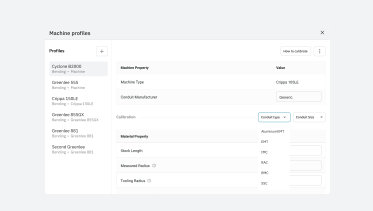
EVOLVE Fabrication now supports IMC, stainless steel conduit, rigid aluminum conduit, and aluminum EMT in Machine Profiles. Selecting a conduit type applies the corresponding material parameter for YBC/MPF file generation.
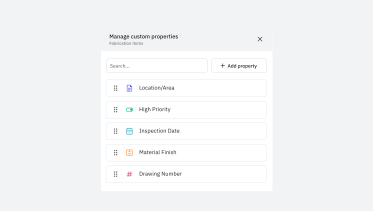
Users can now define custom properties and set values for fabrication items. This custom data travels with the fabrication item so it is available downstream.
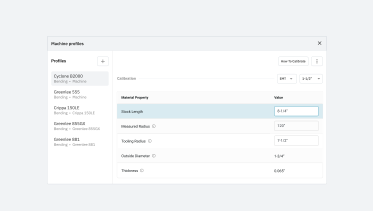
RMC/IMC conduit now supports configurable stock lengths by conduit size to account for the attached coupling. The “Stock Length” is now set per material “Type" and "Size" in the Machine Profile. (Existing machine profiles will be updated with the default values.)

Users can now see a “Pass/Fail” validation status for Revit bends when a fabrication profile is assigned, with failed bends identifying which minimum requirements are not met. Validation checks the front straight, straight between bends, and final straight against configurable requirements by machine, conduit size, material, and bend type. Bend Creator uses the same checks.

Users can now select “Mark Complete” to move a task directly from “Not Started” to “Completed” without starting its timer.
They can also select “Mark Uncomplete” to move a task from “Completed” back to “In Progress,” while preserving the time already recorded.
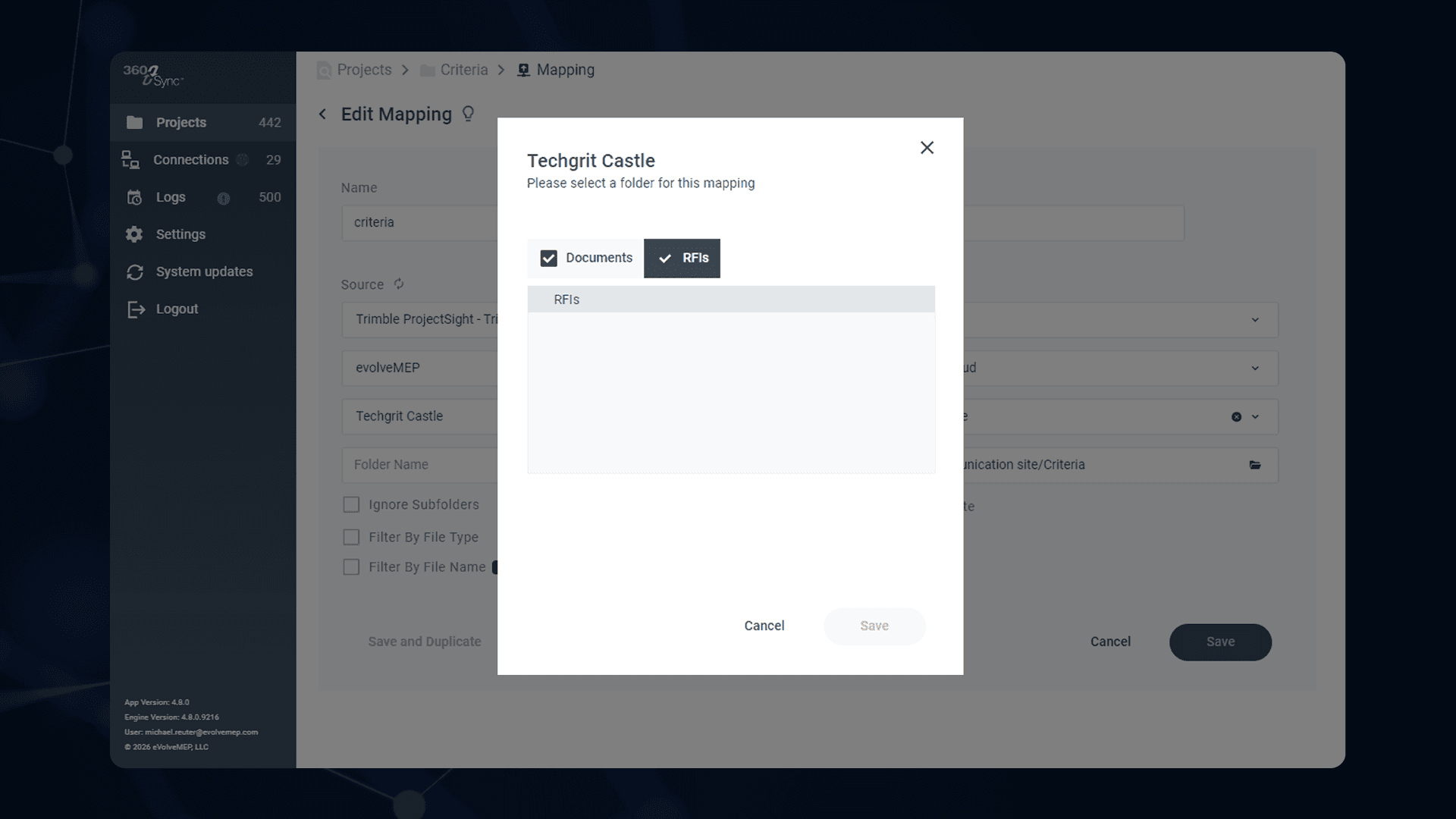
We are quickly adding new features as our Trimble ProjectSight connection continues to grow in popularity. Now, a user can download any or all RFIs from Trimble ProjectSight as a PDF. This will allow you to quickly & easily backup your RFIs (and their attachments). This is great for Project Managers who are migrating a project for Owner turnover or for simply documenting the RFIs for your project in your long term storage. More Trimble improvements coming soon!
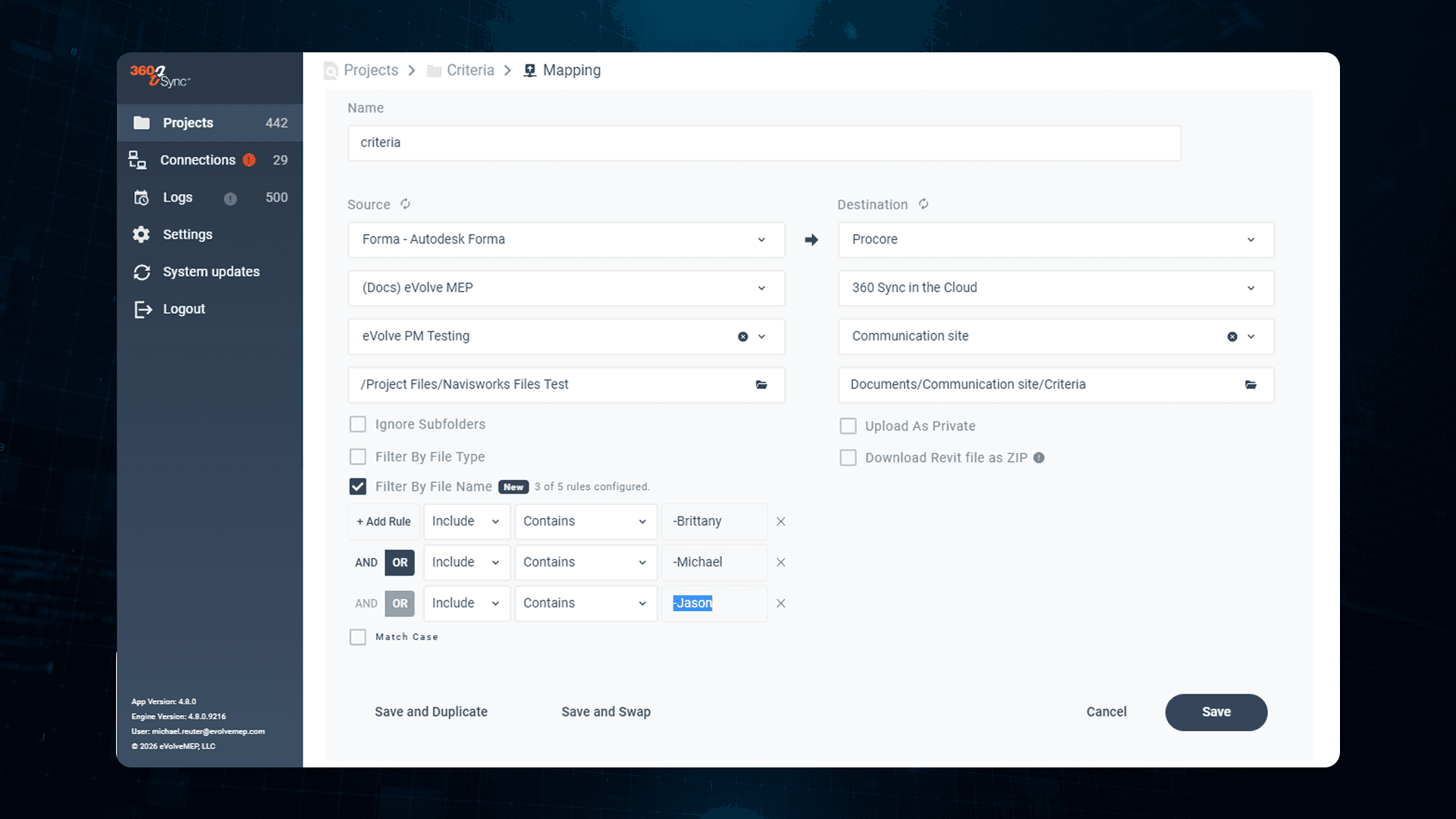
One of our most requested features is now available! Now, in 360 Sync, a user can choose what files are copied based on the file name. Simply click the "Filter by File Name" box to activate the filter. Then type in the text that you want to include or exclude when syncing files. This is a great feature for BIM Coordinators who only need to download certain files or for Project Managers who need to download and review specific files at a specific time.

Users can now print packing slips directly from their shipping orders in EVOLVE Shop. Selecting “Print Packing Slip” in the Shipping details will open a printable packing slip with high-level shipping information, including the items being shipped, order details, delivery instructions, and a QR code linking to the original order.

This release introduces Auto Tag Arrangement for EVOLVE Electrical and Mechanical, allowing detailers to automatically arrange tags on spool sheets in approximately 15 seconds. This helps teams produce drawings faster for applications such as large conduit systems in EVOLVE Electrical and piping and ductwork in EVOLVE Mechanical.
Learn more in our Evolve 10.2 press release.

Take control of EVOLVE alerts with new Notification Settings. Users can now customize their notification channels, assignee alerts, and Work Order status updates to ensure they’re receiving only the most important alerts for the work they're doing.

Bring more model information directly into your fabrication workflow with new parameter-based spooling tags. Add Revit parameter values directly to spool elements in Spooling, then view or edit those tags in either the Spooling or Task views.

Improved dimension callouts in View Bend and Bend Creator now clearly display where each measurement starts and ends, making bend dimensions easier to understand at a glance.

EVOLVE 10.0 is here.
This release introduces targeted enhancements for mechanical and electrical BIM teams, making it easier to prepare models for fabrication while reducing repetitive detailing. By automating work like coordinating ductwork and routing conduit, EVOLVE 10.0 helps eliminate unnecessary time, effort, and project cost.
Learn more in our Evolve 10.0 blog post.

View Bend now allows users to highlight specific bends in their 3D models, making it easier to locate bends and confirm their accuracy. Users can switch between the 3D bend preview and the Autodesk Viewer to see where a bend sits within its spool or the larger model.

Know what shipped, what's ready, and what's still on the floor — without making a call. Shipping Orders gives your team a single place to plan, track, and confirm deliveries from fabrication to the field, so the last mile doesn't become the next bottleneck.
Stop managing shipments out of task lists and spreadsheets. Shop's native Shipping Orders module connects fabricated work order items directly to deliveries — with status tracking, quantity management, and field visibility built in, not bolted on.
Ship what's ready — don't wait for the full order. Partial shipment support lets your team get fabricated assemblies to the field as they're completed, keeping jobs moving even when a work order isn't fully closed out.

360 Sync has expanded its integration capabilities with new support for Trimble solutions, including Trimble Connect, Viewpoint for Projects, and Trimble ProjectSight. This enhancement enables organizations using one of the construction industry’s leading software ecosystems to seamlessly exchange project data with the many other platforms supported by 360 Sync. The streamlined connection process allows users to quickly establish integrations using their Trimble credentials and application settings, providing secure and efficient data sharing between systems. As adoption of Trimble platforms continues to grow, these new integrations strengthen 360 Sync’s ability to serve a broader construction community while improving interoperability and reducing data silos across project teams.

360 Sync now includes a bulk project scheduling feature designed to simplify administration for organizations managing large numbers of projects. Users can schedule existing projects, unscheduled projects, or both simultaneously, eliminating the need to configure synchronization settings individually.
The feature allows administrators to define synchronization days, times, and intervals, automatically staggering project syncs to optimize system performance and reduce administrative effort.
This enhancement is particularly valuable for organizations with frequent password or security policy changes, as it significantly reduces the time required to update and maintain synchronization settings across hundreds of projects, improving both efficiency and operational continuity.

360 Sync introduces several enhancements to RFI and submittal workflows, giving users greater control over how project information is synchronized. Users can now filter RFIs and submittals based on status, response criteria, ball-in-court assignments, or last updated dates, allowing teams to synchronize only the information that is most relevant.
For existing projects, synchronization can also begin after a specified date to prevent duplicate records and support smoother transitions from manual processes. Additionally, users can choose how attachments are managed, either maintaining individual files within organized folders or automatically merging cover sheets and supporting documents into a single PDF.
These improvements streamline document management, reduce administrative effort, and provide greater flexibility when managing RFI and submittal data.

The new Project Migration Tool in 360 Sync enables organizations to quickly and efficiently migrate multiple projects between platforms in a single workflow. Users can select source and destination systems, identify migrated and unmigrated projects, and choose individual projects or entire groups for transfer.
In addition to creating corresponding projects and maintaining project mappings, the tool supports the migration of documents, drawings, RFIs, submittals, photos, contract data, and user information. By automating project creation, data mapping, and content transfer, 360 Sync significantly reduces the time and effort required to migrate large volumes of project data, allowing teams to move dozens or even hundreds of projects with ease.

360 Sync has introduced several enhancements to its logging and monitoring capabilities, providing users with greater visibility and control over synchronization activity. New log features include data transfer tracking that displays the exact amount of data synchronized, advanced filtering options to quickly identify successful or failed files, and downloadable Excel reports that provide detailed error information, file locations, and troubleshooting guidance.
Additional improvements include direct access to project mappings from the log interface, enhanced search functionality for quickly locating specific errors or events, and customizable notification options that deliver immediate alerts, daily summaries, or successful sync confirmations.
Together, these updates simplify troubleshooting, improve project oversight, and help users maintain more reliable and efficient synchronization workflows.

360 Sync introduces several powerful enhancements designed to improve reliability and streamline file synchronization workflows. New automated error handling detects unsupported characters in file and folder names and intelligently replaces them with compatible characters, ensuring seamless transfers between platforms while maintaining file associations for future sync operations.
Additionally, enhanced bidirectional synchronization now tracks file and folder moves, renames, and deletions across connected locations, automatically reflecting these changes in both directions.
These improvements eliminate common synchronization issues, reduce manual intervention, and provide users with a more accurate, efficient, and dependable file management experience.

Today, we're releasing our latest update to tasks: individual assignee time tracking. Tasks now have a time tracking panel which allows you to assign and individually track employees labor time.
Just toggle on whoever is working on the task and hit the Play button. The task timer will automatically track their time and add it to an entry in Time Tracking section of Shop.

Fabrication is now better integrated with Shop, allowing users to manage fabrication-related tasks within their broader work order. Users focused primarily on fabrication can still work from the dedicated Fabrication tab.

EVOLVE Shop now includes Work Order Travelers, providing a simple way to keep critical job information connected to work as it moves through the shop. Users can generate and print a traveler directly from a Work Order, which includes a summary of top-level work items along with a unique QR code.
The traveler can be printed as a PDF and accompany materials throughout the fabrication process, ensuring teams always have access to key work order details.
By scanning the QR code with a supported tablet or iPad, users can instantly navigate to the associated Work Order Details page, improving traceability and access to real-time project information.

EVOLVE Shop now includes built-in PDF markup capabilities, allowing users to review, annotate, and collaborate on drawings directly within Work Orders and Tasks.
Users can add text, freehand sketches, highlights, shapes, symbols, and comments to communicate questions, revisions, or important details without leaving the platform.
Markups can be saved and shared with the entire team, creating a centralized source of truth for drawing-related communication. Users can also undo changes, clear markups, and download either the marked-up or original version of the PDF as needed for documentation and record keeping.
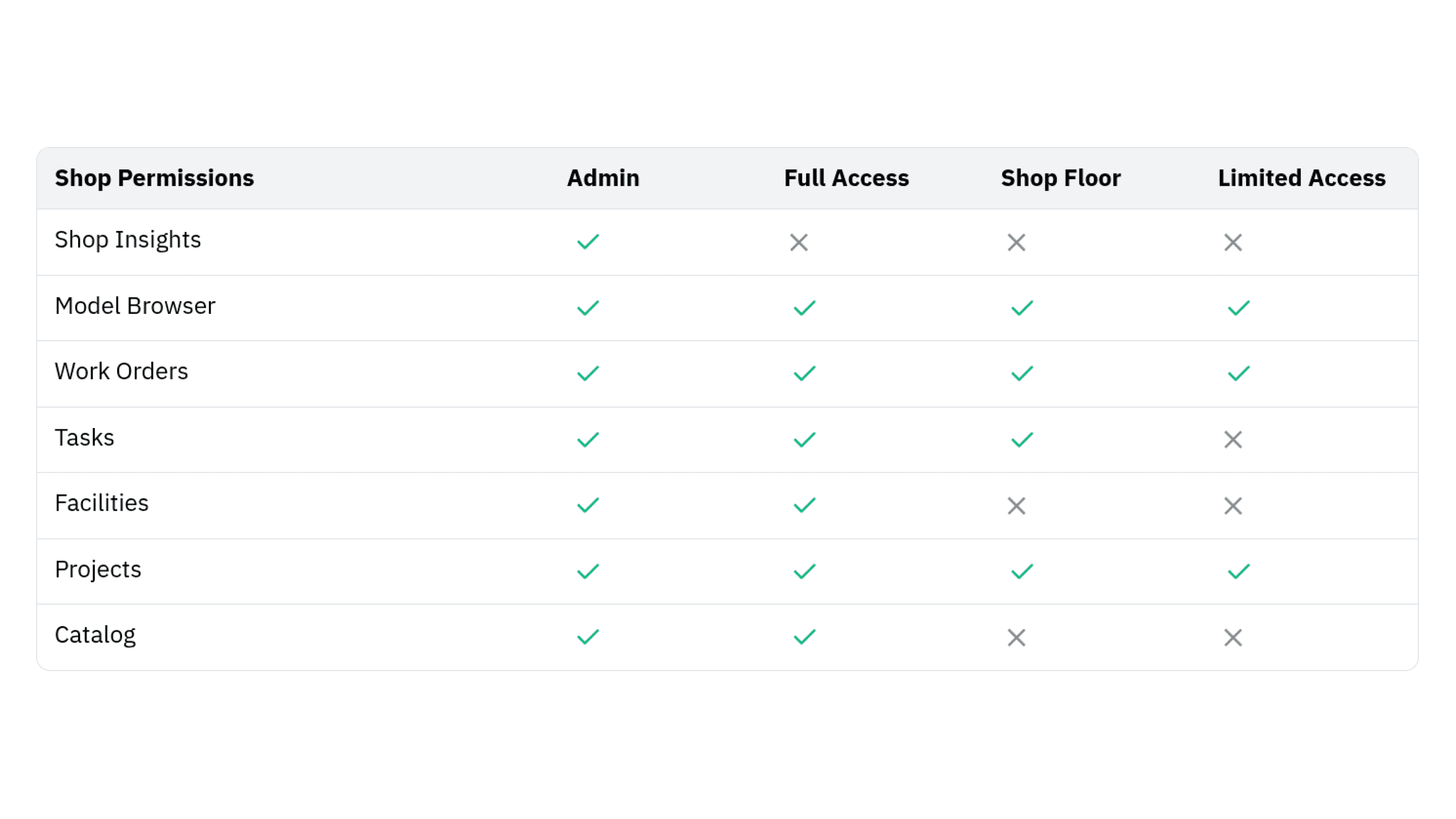
EVOLVE Shop now includes a dedicated Shop Floor role designed specifically for fabrication and production personnel. This new permission level bridges the gap between Limited Access users, who primarily submit and view work orders, and Full Access or Admin users who manage facilities, projects, and company administration.
Shop Floor users have access to the Task module, allowing them to start, pause, complete, and manage tasks required for their daily work without being exposed to management-focused features such as facility administration, performance analytics, or company settings.
By providing a streamlined experience focused on task execution, the Shop Floor role helps workers stay productive and focused on fabrication activities while reducing unnecessary complexity.

The latest EVOLVE Professional release introduces several enhancements focused on improving project administration, data accessibility, and workflow efficiency.
New Roles & Permissions capabilities allow administrators to assign user roles and control editing access to project settings, while Project Setup tools make it easy to save user and project configurations to the cloud and quickly load them when needed. T
he new Model Data Capture feature enables teams to extract quantity takeoffs and other model information to support project tracking, reporting, and custom data analysis.
To learn more, read the release notes.

The latest EVOLVE Professional release introduces several new capabilities designed to improve project management, user administration, and data accessibility.
New Roles & Permissions functionality gives administrators greater control over project settings by allowing them to assign user roles and manage editing permissions.
Additionally, the new Project Setup feature enables users to quickly upload project and user settings to the cloud and reload them as needed, helping teams standardize configurations and reduce setup time.
Model Data Capture further expands project visibility by allowing users to extract quantity takeoffs and other model information for progress tracking, reporting, and custom queries.
To learn more, read the release notes.

Bring bends to life before fabrication with a new 3D preview in Bend Creator. A bend's shape, size, measurements, and machine-specific radius will accurately reflect user inputs.
Try our Bend Creator demo!

EVOLVE Fabrication enables bend information from both VDC models and field requests to flow directly into the prefab shop through a centralized digital workflow whether you're running CNC benders or traditional benders.
EVOLVE Fabrication creates a connected workflow that:
Reduces manual effort
Minimizes communication gaps
Eliminates rework caused by bender changes
Whether bends originate in the VDC model or come in from the field, your prefab shop gets accurate instructions — every time.
Read our Fabrication announcement post.